
If you have ever inherited a client website built with the BeTheme WordPress theme, you likely know the specific kind of dread that sets in when they ask to switch to a new theme.
Recently, I had a client wanting to transition away from BeTheme (and its proprietary “Muffin Builder”) to a more modern, standard theme like Astra or GeneratePress. In theory, this should be simple: install the new theme, maybe tweak some CSS, and you’re done.
In reality, I activated the new theme and watched every single page of content vanish into thin air.
The Technical Problem: Where did the content go?
To understand why this happens, you need to know how WordPress stores data. Standard WordPress themes use the post_content column in the wp_posts database table to store the text and HTML you see on a page. When you switch between standard themes, that data remains, and the new theme simply displays it with different styling.
BeTheme works differently. It bypasses the standard content field almost entirely.
Instead, it stores its page builder layout and content in the wp_postmeta table. Specifically, it compresses the entire page’s data, encodes it into a base64 string, and hides it under a specific meta key called mfn-page-items.
I’ve created a diagram below to visualize this critical difference.
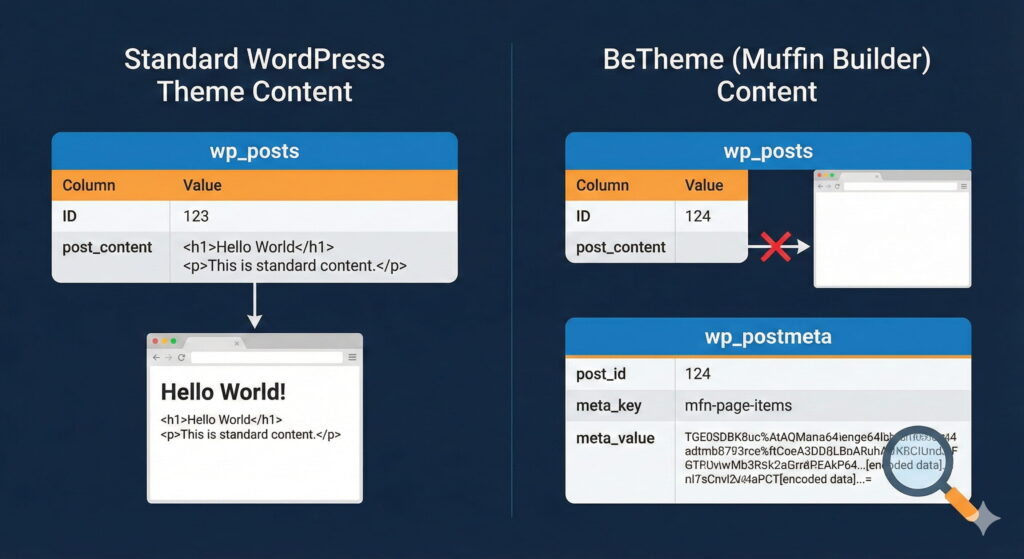
As you can see, as soon as you deactivate BeTheme, WordPress looks for content in the standard place, finds nothing, and disThe Search for a Fix
Facing a website with hundreds of pages, manual copy-pasting wasn’t an option. I scoured the internet for a migration tool or an exporter that supported Muffin Builder. The results were bleak. Standard WordPress XML export tools failed because they just exported empty post content or raw, useless base64 strings.
The only glint of hope I found was an archived Reddit thread from several years ago. It discussed this exact nightmare and even linked to a zip file for a custom plugin intended to fix it. I downloaded it, fired up my local environment, and… errors. The plugin was outdated, using deprecated code that simply didn’t work with modern PHP or WordPress versions.
The Solution: Building a Custom Migrator Plugin
With no off-the-shelf solution available, I decided to build one.
My goal wasn’t to perfectly replicate the complex columns and distinct styling of the Muffin Builder—that varies too much between themes. My goal was data liberation: taking the core content (text, headings, and images) out of that encoded meta field and normalizing it into standard HTML that any theme (Block Editor, Elementor, Divi, or raw PHP) could actually read.
I wrote a plugin that performs the following steps:
- Scans posts for the existence of the
mfn-page-itemskey. - Decodes the base64 string to reveal the hidden data structure.
- Iterates through the BeTheme-specific builder items.
- Extracts the most relevant data (primarily text fields and media).
- Injects the cleaned HTML back into the standard
post_contentfield.
The result is a clean slate. You get your content back in the native WordPress editor, ready to be styled by your new theme.The Search for a Fix
Facing a website with hundreds of pages, manual copy-pasting wasn’t an option. I scoured the internet for a migration tool or an exporter that supported Muffin Builder. The results were bleak.
Standard WordPress export tools (XML) failed because they just exported the empty post_content or the raw, useless base64 strings.
The only glint of hope I found was an archived Reddit thread from several years ago. It discussed this exact nightmare and even linked to a zip file for a custom plugin intended to fix it. I downloaded it, fired up my local environment, and… errors. The plugin was outdated, the code was deprecated, and it simply didn’t work with modern PHP or WordPress versions.
The Solution: Building a Better Migrator
With no off-the-shelf solution available, I decided to build one.
My goal wasn’t to perfectly replicate the complex columns and distinct styling of the Muffin Builder—that varies too much between themes. My goal was data liberation: taking the core content (text, headings, and images) out of that encoded meta field and normalizing it into standard HTML that any theme (Block Editor, Elementor, Divi, or raw PHP) could actually read.
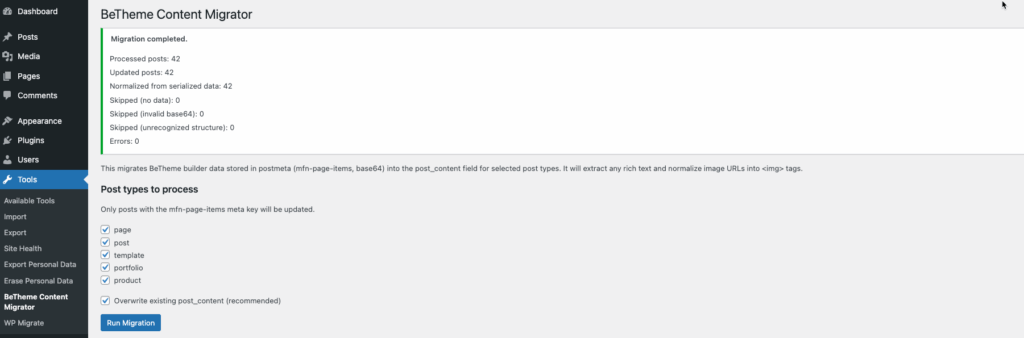
I wrote a plugin that:
- Scans posts for the
mfn-page-itemskey. - Decodes the base64 string to reveal the hidden data.
- Iterates through the BeTheme-specific items.
- Extracts the most relevant data (text and media).
- Injects it back into the standard
post_contentfield.
The result is a clean slate. You get your content back in the native WordPress editor, ready to be styled by your new theme.
Download the Free Tool
I’m making this tool available for free for anyone else stuck in the “Muffin Builder Trap.” You can review the code or download it directly below.
- View the Repo: GitHub: BeTheme Migrator
- Direct Download: Download.zip
⚠️ Important Note: As always, please backup your database before running any migration scripts. This plugin directly alters your database by populating the post content field, so it is best used in a staging environment first!
A Quick Side Note for WooCommerce Users
While we are on the topic of solving unique WordPress headaches with specialized plugins, I wanted to mention another common issue I run into.
If you run a WooCommerce store that sells both standard products and subscription products, you know that standard WooCommerce coupons only work with standard products and subscription coupons only work with recurring payments.
I developed a plugin called Better Recurring Coupons to fix this. It allows you to create unique coupons that specifically allow you to use single coupons for both your standard products as well as subscription-based products.
- You can grab the free version here: Better Recurring Coupons on WordPress.org
- For advanced features, check out the Pro version: Better Recurring Coupons Pro
I hope these tools help streamline your WordPress projects!